Product: BTN-1 (non-battery variation)
Firmware version: Apollo Firmware Version: 26.3.2.1, ESPHome Version 2026.4.0
Platform: Home Assistant (not added to ESPHome Builder, so using Apollo’s pre-built firmware) and Apollo’s blueprint
What’s happening:
I keep having situations where I can press a button and maybe it works. But then if I wait a few seconds and press it again, it won’t work.
Steps to reproduce:
I can’t reliably reproduce it. Sometimes when I press a button it will work. Sometimes it won’t.
When it isn’t working, I have tried unplugging it and plugging it back in. Usually, it still won’t work immediately, but after some period of time (multiple minutes), it will work again for at least 1 or 2 button presses.
What I’ve already tried:
Mostly just tried rebooting by unplugging which often doesn’t seem to fix it–at least not right away.
I’ve also tried to look at the Automation traces for the blueprint, and when it’s not working, I don’t get any automation trace.
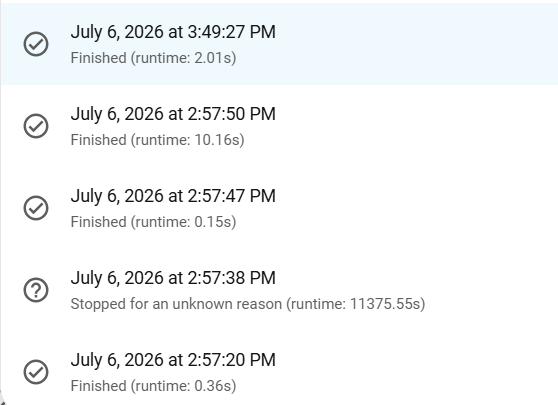
There was one odd trace where it shows that it ran for 11,375 seconds!
Triggered by the event 'state_changed' at July 6, 2026 at 2:57:38 PM

Test If template renders a value equal to true

Define variables action and button

Choose: Option 1 executed

Stopped because of unknown reason at July 6, 2026 at 6:07:14 PM (runtime: 11375.55 seconds)
Logs, screenshots, or YAML:
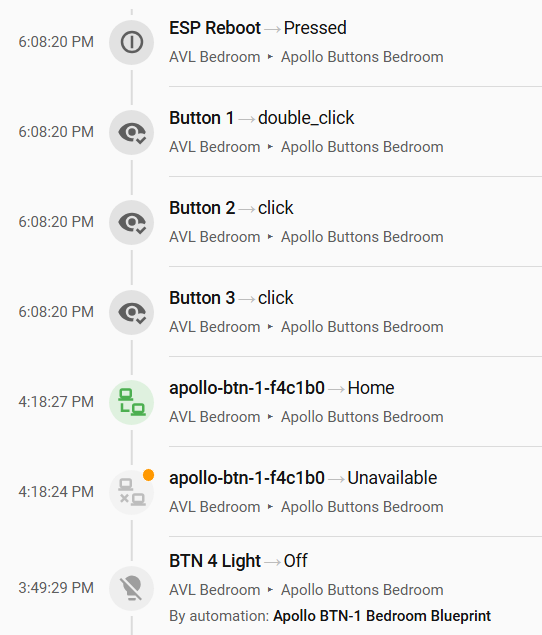
Here’s another “odd” thing. You can see where it was working at 3:49, but then stopped. A while later at 4:18 is becomes “Unavailable” but then quickly “reconnects”? Then a little later at 6:08 it seems to have registered some clicks, but as you can see from the blueprint automation trace list above, the automation never got called. And at 6:08 it shows that “ESP Reboot” was pressed, but I never pressed the reboot button.
Hardware or shipping issues? Email support@apolloautomation.com. For everything else we can help here.